
I regularly participate in a weekly Twitter Chat called #lrnchat. The chat has been around for a few years, and has grown in popularity during that time, often generating hundreds of tweets during it’s 90 minute sessions.
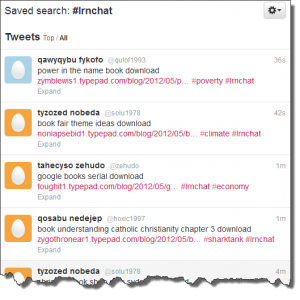
That type of volume gets attention, and not all of it good. Any time there’s a gathering of multiple people in a virtual space, it’s a ripe opportunity for spammers. Over the last few weeks, the #lrnchat hashtag has been getting hammered by spam, mostly by automated Twitter accounts (often called bots), that post links to websites using the hashtag.
The volume of spam has been so bad, it began to be a distraction for the #lrnchat discussion feed. Unfortunately, Twitter’s blocking functionality only works on a user level, and there are hundreds of bot accounts pumping out spam. As one of the moderators of #lrnchat, I felt an urgency to find ways to battle this spam to protect the integrity of the chat.
In looking into the spam, I noticed a pattern. Almost all of the spam came from the same source: “Mobile Web”.
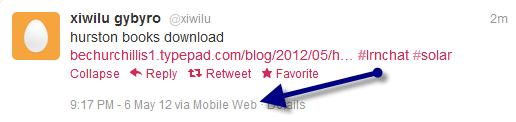
While not well known, Twitter does offer a number of operators that can be used to help filter the tweet stream. Operators are instructions that can be added to a twitter search to add an additional layer of filtering. For example, searching Twitter with #lrnchat filter:links will show you only those tweets that contain the hashtag #lrnchat AND contain a hyperlink. Another one of the operators is SOURCE.
However, in this case we’re not trying to see a specific source, we’re trying NOT to see one. You can filter out an operator by placing a minus sign before the operator. In the case of the Mobile Web source, this is the search you would enter into Twitter to search the #lrnchat feed and ignore tweets from the mobile web:
#lrnchat -Source:”Mobile Web”
NOTE: The phrase “Mobile Web” must be entered in quotes. This indicates it is a multi-word source.
Shown below is a side by side comparison of the #lrnchat feed, and the #lrnchat feed with the “Mobile Web” source removed.
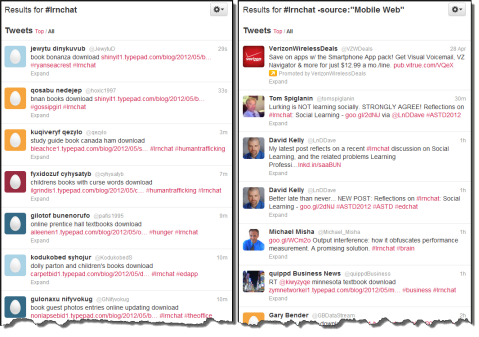
As you can see, it makes the feed much more concise, eliminating almost all of the spam being populated by bots via the mobile web.
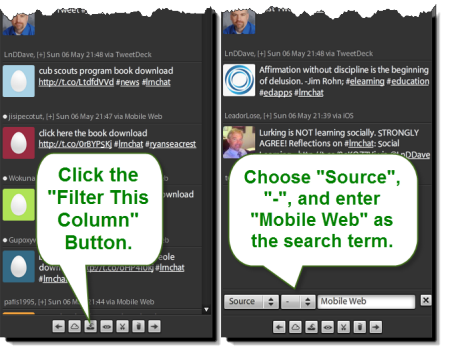
The above example is done via the twitter.com website. The search will also work with the official Twitter apps for smart phones and tablets. However, many people use third-party applications for Twitter and Twitter Chats. Some of those applications (like TweetChat) do not support Twitter operators in their search criteria. Others might. For example, you can filter out a specific source if you are using the desktop version of Tweetdeck. The image below shows how.
This isn’t a foolproof method, but it did seem to make an enormous difference in the quality of the #lrnchat tweet stream last week, which in turn enhanced my learning experience from the chat. I highly recommend you try this approach with any hashtag you find being attacked by spam.
Do you know of other techniques in battling hashtag spam? Please feel free to add your ideas in the comments.